VERDICT
How much does Coursera cost in 2026?
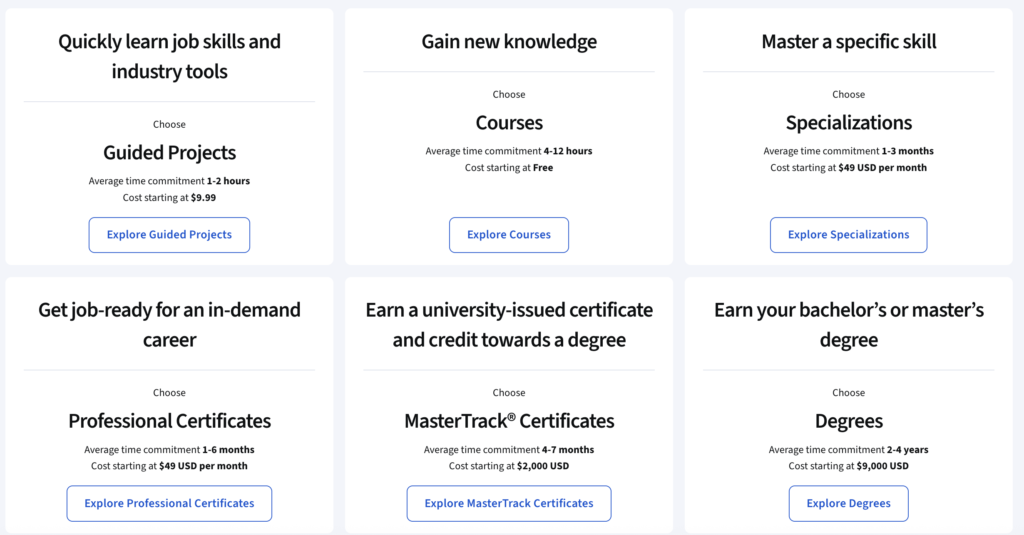
Coursera’s pricing structure is more layered than most people expect. You can preview courses for free, pay $49–$99 for a single certificate, or spend $399/year on Coursera Plus and unlock almost everything on the platform. The right option depends entirely on how many courses you plan to take, and whether a certificate actually matters to you. This guide breaks down every plan clearly, including what teams and companies pay for business access.
Coursera pricing at a glance (2026)
| Plan | Price (USD) | Certificate included | Best for |
|---|---|---|---|
| Free preview (formerly audit) | $0 | No | Sampling a course’s first module before paying |
| Individual course | $49–$99 one-time | Yes | One specific certificate |
| Specialization / Professional Certificate | $39–$79/month | Yes | One structured program |
| Coursera Plus (monthly) | $59/month | Yes, unlimited | Flexible short-term access |
| Coursera Plus (annual) | $399/year ($33.25/month) | Yes, unlimited | Best value for serious learners |
| MasterTrack certificate | $2,000–$5,000 total | Yes (university-grade) | Graduate-level credential |
| Bachelor’s degree | $9,000–$25,000 total | Yes (accredited) | Full undergraduate qualification |
| Master’s degree | $15,000–$50,000 total | Yes (accredited) | Full postgraduate qualification |
| Coursera for Teams (B2B) | ~$399/user/year | Yes, unlimited | Teams of 5–499 |
| Coursera for Enterprise | Custom quote | Yes, unlimited | 500+ employee organisations |
Choose an individual course purchase if you:
- Need one specific certificate — say, a Google Data Analytics or IBM AI certification
- Won’t be taking more than 1–2 courses in the next year
- Prefer a one-time payment rather than a recurring subscription
- Are targeting a single skill gap rather than a broad career transition
Choose Coursera Plus if you:
- Plan to complete three or more courses or specializations in the next 12 months
- Are in the middle of a career pivot and need to build several skills at once
- Want to experiment across subjects without paying per course each time
- Need multiple certificates for your CV or LinkedIn profile
Choose a business plan if you:
- Are an HR manager, L&D lead, or team lead looking to upskill a group
- Have 5–499 employees who need structured learning with progress tracking
- Want to run custom learning paths, not just assign open courses
- Need admin reporting, SSO integration, or a dedicated account manager
How Coursera pricing works
Coursera was known for offering thousands of single courses for free — without a certificate, but with full access to lectures and readings. That changed in late 2024. Now the free options are a course preview (typically just the first module) and a 7-day free trial of Coursera Plus; the full course materials are paid.
Coursera pricing splits into three main paths:
Pay per course. Individual courses cost $49–$99 as a one-time purchase. You get the certificate, graded assignments, and lifetime access to that course’s materials. This makes sense if you want one specific credential.
Subscribe to Coursera Plus. At $59/month or $399/year, you get unlimited access to over 10,000 courses, specializations, and professional certificates. No per-course charges. This is the better option the moment you’re taking more than a handful of courses in a year. Most AI automation courses and generative AI courses available on Coursera are included in the Plus subscription — so if building AI skills is your goal, the annual plan covers essentially everything you’d pick from those lists.
Enrol in a degree program. Coursera partners with real universities to offer accredited bachelor’s and master’s degrees fully online. These cost $9,000–$50,000 depending on the institution and program, and they sit completely outside the Plus subscription.
One thing that trips people up: Coursera Plus does not cover everything. Degree programs are excluded. Some MasterTrack certificates ($2,000–$5,000) require separate payment. That said, for most learners — especially those focused on professional certificates and specializations — Plus covers essentially everything they’d want.
What happened to Coursera’s free audit option?
Coursera quietly ended most free auditing in late 2024, after a leadership change put previously free university courses behind a paywall. What used to be “audit”, which was full access to lectures and readings without paying, has largely been replaced by a free preview: typically just the first module, often a single introductory video.
In practice, that means the free tier in 2026 works like this: you can browse the catalog, preview the opening module of most courses, and access a shrinking number of older courses that still carry the classic audit option. For full lectures, graded work, or a certificate, you’ll need either a one-time course purchase (usually $49–$79 for 180 days of access) or a Coursera Plus subscription. If a course page shows “Preview” instead of “Audit,” the paywall applies. Financial aid remains the genuine free route — it still covers full access and the certificate if approved.
Coursera Plus pricing: what you actually pay
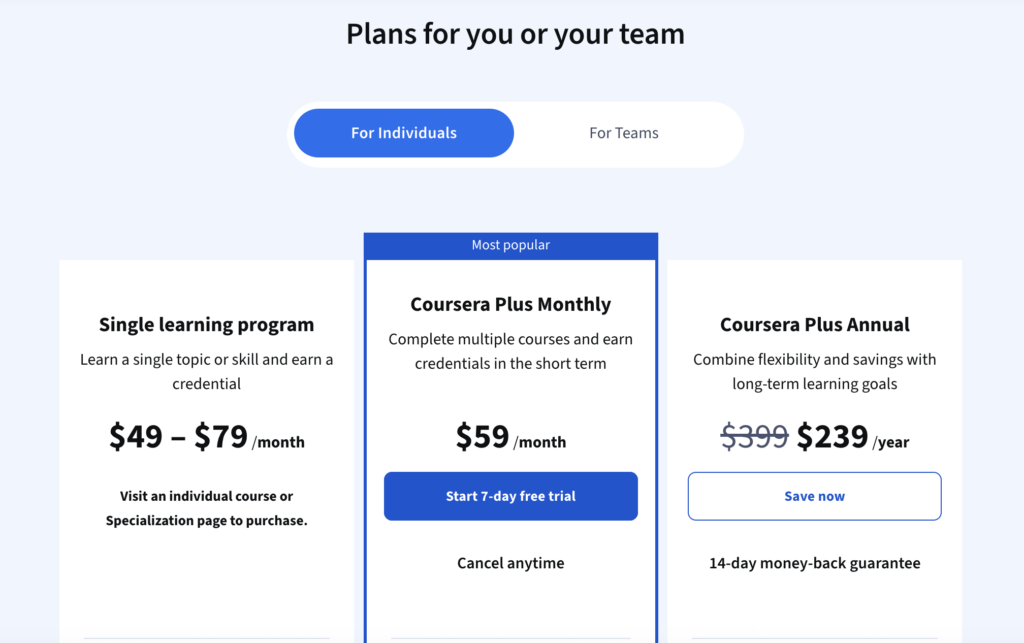
Coursera Plus is the subscription most people should consider seriously. It comes in two plans, and the annual one is where the savings are. Here’s the full breakdown:
Coursera Plus c
| Plan | USD | GBP | EUR | Best for |
|---|---|---|---|---|
| Monthly | $59/month | £43/month | €51/month | Testing the platform, or one short burst of study |
| Annual | $399/year | £296/year | €346/year | Anyone taking more than two programs in a year |
Twelve months of monthly billing costs $708. The annual plan is $399, so paying up front saves you $309. The same holds in the other currencies: £516 against £296, a saving of £220, and €612 against €346, saving €266. Around 43% in all three.
Those aren’t converted figures. Coursera sets a separate price for each region and serves it based on where you’re browsing from, so a VPN won’t get you a better deal. At current exchange rates the three annual prices land within a few dollars of each other anyway.
The discounts, and what they’re not
Coursera runs promotions constantly, but they’re on the monthly plan rather than the annual one. The offer live in September 2026 takes 40% off your first three months: $35 a month in the US, €30.60 in the eurozone, with the same 40% deal running in the UK.
You’ll also see a “Save 40%” badge sitting next to the annual option on Coursera’s pricing page. That badge compares annual billing to twelve months of monthly billing. It is not 40% off the $399 price. Easy to misread, and it sends people hunting for a coupon code that doesn’t exist.
Trial and refunds
You get seven days free before Coursera charges you. Enough time to start a course, watch a few hours of it, and see whether the library covers what you want to learn.
On the annual plan there’s a 14-day money-back guarantee after that. Monthly works differently: cancel any time and you keep access until your billing period ends, but you don’t get cash back for the month you’re already in.
What you get, and what you don’t
Coursera Plus covers more than 10,000 courses, Specializations and Professional Certificates. That includes the Google, IBM and Meta certificates, plus university content from Duke, Stanford and Johns Hopkins. Hands-on projects are in, and so are unlimited certificates for everything you finish.
Degrees and MasterTrack certificates sit outside it, along with a small number of courses and Professional Certificates from certain partners. Check the course page for the “Included with Coursera Plus” label before you assume yours is covered.
When Plus is actually cheaper
The comparison most people want is Plus against a single Professional Certificate subscription. A certificate runs $49 to $79 a month, and most sit at the $49 floor.
At $49 a month, you’d need roughly eight months on that certificate before Plus would have been the better buy. At $79, about five. So if you’re doing one certificate and you finish it in the six months Coursera suggests, paying for the certificate on its own is cheaper. Plus wins when you’re taking two or more programs, or when you’re honest with yourself about how long you’ll take.
If you’re on the fence, the annual plan at $399 (or lower with a promo) is almost always the better choice over monthly. For a deeper look at whether the subscription delivers on its promise, read our Coursera Plus review — it covers course quality, certificate value, and honest downsides alongside the pricing.
Individual course pricing
Not everyone needs a subscription. If you want one specific certificate and nothing else, buying individually makes sense.
Individual course prices run $49–$99 per course. Specializations — which bundle several courses together into a structured program — are typically priced as monthly subscriptions at $39–$79/month until you finish.
The math gets a bit unpleasant with specializations. A typical specialization takes two to four months to complete. At $49–$79/month, that’s $100–$316 per specialization. If you have two specializations in mind, you’ve already spent more than the annual Coursera Plus plan.
Professional certificates — Google’s, IBM’s, Meta’s — work the same way. They cost $39–$79/month and take three to six months on average. One of these alone can run $200–$400. A Coursera Plus subscription covers all of them with no per-program charge.
The break-even point is basically one specialization. If you’re taking just one standalone course with no graded work and no certificate, auditing is free. If you want a certificate from a single course, pay for it individually. If you’re doing anything more than that, Coursera Plus is cheaper.
Degree program pricing
Coursera’s degree programs are in a different category entirely — these are accredited qualifications from real universities, not just certificates you earn on a platform.
| Degree type | USD | GBP (approx) | AUD (approx) | Duration |
|---|---|---|---|---|
| Bachelor’s degrees | $9,000–$25,000 | £7,000–£19,500 | A$13,500–A$37,500 | 2–6 years (flexible) |
| Master’s degrees | $15,000–$50,000 | £11,700–£39,000 | A$22,500–A$75,000 | 1–3 years |
| MasterTrack certificates | $2,000–$5,000 | £1,560–£3,900 | A$3,000–A$7,500 | 4–12 months |
GBP and AUD figures are approximate conversions. Degree programs are typically invoiced in USD regardless of your location — confirm the exact billing currency with the programme before enrolling.
These are not covered by Coursera Plus. They’re full degree programs from schools like the University of London, University of Michigan, HEC Paris, and Illinois Tech. For context, these programs cost a fraction of on-campus equivalents — a master’s through Coursera’s university partners typically runs 20–40% of what the same degree costs in person.
MasterTrack certificates sit between a professional certificate and a full degree. They’re university-designed, credit-eligible, and aimed at professionals who want graduate-level credentials without committing to a full degree.
Financial aid is available for many courses, specializations, and professional certificates — not degree programs. You apply directly from the course page. Applications ask about your educational background, employment status, and learning goals. Answers need to be substantive (at least 150 words each). If approved, you get full access including graded work and the certificate for free, with 180 days to complete it.
Coursera for Business pricing: teams and enterprise
Coursera’s business plans work differently from the individual pricing. They’re aimed at companies that want to upskill employees at scale, with admin controls, reporting dashboards, and custom learning paths.
There are two main tiers:
Coursera for Teams is for groups of 5–499 people. Pricing starts at roughly $399 per user per year, billed annually. At that price, each seat is equivalent to the annual Coursera Plus plan — but with added admin features, team progress tracking, custom learning paths, AI-assisted learning guidance, and content translations. The minimum team size varies, but groups of 5–25 are the typical entry point.
Coursera for Enterprise is for organisations with 500+ employees. Pricing is custom, quoted based on learner count, content tier, and contract length. Enterprise plans add dedicated customer success managers, SSO and HRIS integrations, custom content creation tools, and a more hands-on onboarding process. There’s typically a minimum annual contract value.
A few practical notes on business pricing:
Volume gets you discounts. Teams in the 25–100 user range regularly negotiate 10–20% below the listed rate by committing to longer contract terms or higher seat counts.
Not all content is in the Teams plan. The full Coursera Plus library is available, but some premium content, degree programs, and certain MasterTrack certificates require separate agreements.
Enterprise customers get content creation tools. Coursera’s AI-assisted course builder lets companies create internal training courses on top of the existing catalog — something the Teams plan doesn’t include.
Pricing is not publicly listed for Enterprise. If you’re evaluating it for a large organisation, you’ll need to contact Coursera’s sales team directly. Third-party procurement data (Vendr, G2) suggests enterprise contracts typically run $400,000–$2M+ annually for large deployments.
| Plan | Users | Price | Best for |
|---|---|---|---|
| Coursera for Teams | 5–499 | ~$399/user/year | SMBs, department-level L&D |
| Coursera for Enterprise | 500+ | Custom quote | Large organisations, complex integrations |
How Coursera compares to competitors on price
| Platform | Individual course | Subscription | Certificate included | Best for |
|---|---|---|---|---|
| Coursera Plus | $49–$99 | $399/year | Yes, unlimited | University-backed credentials |
| Udemy | $11–$200 (frequent sales) | None | Yes, per course | One-off skill purchases |
| LinkedIn Learning | $20–$50 | $299.88/year | Yes | Professionals on LinkedIn Premium |
| Skillshare | N/A | $99/year ($8.25/month) | No (projects only) | Creative skills |
| edX | $50–$300 | None standard | Yes | MicroMasters, university credit |
The honest comparison: Udemy is cheaper if you’re buying individual courses on sale (they discount aggressively, often to $13–$15). LinkedIn Learning is slightly cheaper on subscription ($299.88/year vs $399) but has a smaller, less rigorous catalog. Skillshare is the cheapest subscription by far but doesn’t offer real certificates.
Coursera sits at the premium end for individuals because its certificates come from recognisable institutions. A certificate from a Google, IBM, or Johns Hopkins program on Coursera carries more weight with employers than a generic “course completion” badge from most alternatives. If you’re also weighing Coursera against Udacity — which takes a different approach with project-based nanodegrees — our Coursera vs Udacity comparison covers the pricing difference alongside what you actually get for the money.
What users say about Coursera pricing in 2026
On Coursera Plus
- Most learners who went annual felt it paid for itself within the first 2–3 courses — especially those pursuing professional certificates from Google or IBM.
- Career changers building a portfolio from scratch consistently describe the annual plan as “the only plan worth considering” once they’re committed to upskilling.
- Users returning after a gap often find their courses have been restructured, which means previous progress doesn’t always carry over cleanly.
- The most common complaint is that the catalog size is both a strength and a problem: finding quality courses takes effort, and some subjects have better depth than others.
- Another recurring complaint is discovering exclusions after subscribing: learners pay for Plus, click into a course they wanted, and get asked for another $49. DeepLearning.AI and Stanford courses come up most often — several buyers on deal forums say the exclusion alone was their reason not to subscribe. Checking the “Included with Coursera Plus” badge on your target courses before paying avoids the whole problem.
On individual course pricing
- Learners buying single courses without a Plus subscription sometimes feel the $49–$99 price is fair for well-produced content, but steep when the course is shorter or shallower than expected.
- The subscription model for specializations frustrates people who don’t finish quickly — monthly billing adds up, and life gets in the way.
- Several reviewers note they audited a course first, liked it, then paid for the certificate after — which is a perfectly reasonable way to use the platform.
On business plans
- L&D managers generally find the Teams plan reasonable compared to alternatives like LinkedIn Learning for Teams or Udemy Business.
- The main friction in enterprise contracts is onboarding time and SSO setup — praised by large IT teams, frustrating for smaller teams expecting plug-and-play.
- Managers report strong completion rates when learning paths are assigned with deadlines, weaker when courses are simply made available without structure.
- The most serious complaints are about billing mechanics, not price: users report charges continuing after cancellation, no emailed receipts for monthly billing, and support that loops through automated responses with no phone option. Setting a calendar reminder before any renewal date and screenshotting your cancellation confirmation are the standard defenses mentioned in reviews.
On the loss of free courses (free auditing option)
- The single most emotional theme in recent reviews is the disappearance of free auditing. Long-time learners describe going back to courses they’d previously watched in full for free and finding only a first-module preview — often just an introductory video — with everything else paywalled.
- The practical frustration is inconsistency: some older courses still carry the classic audit option, newer ones show “Preview” only, and nothing on the catalog page tells you which is which before you click through.
- Learners who used auditing as a try-before-you-buy step say the 7-day Plus trial doesn’t fully replace it — the trial requires a payment card and covers one week, while auditing let them evaluate a course over weeks at their own pace before paying for the certificate.
Frequently asked questions
Is Coursera free?
Coursera used to be, but now it’s not. Until late 2024, you could audit most courses in full for free; today most courses offer only a free preview of the first module, with full lectures, graded work, and certificates behind payment. Financial aid is available for learners who can’t afford course fees; applications are reviewed within 15 days on average.
How much does Coursera Plus cost per month?
The monthly plan is $59/month. The annual plan works out to $33.25/month ($399/year). If you’re comparing those two options, the annual plan is meaningfully cheaper — you save $309 over 12 months — and it includes a 14-day money-back guarantee that the monthly plan doesn’t offer.
Is the $49 fee per course or per month?
Both exist, and the enroll button tells you which one you’re looking at. A standalone course is a one-time payment — usually $49–$79 — that buys you 180 days of access, graded assignments, and the certificate. A Specialization or Professional Certificate is a monthly subscription at a similar price ($49–$79/month) that keeps billing until you finish or cancel, so a 4-month program costs 4 payments, not one. This is the single most common billing surprise on Coursera: people assume $49 is the total, complete the program slowly, and pay double or triple what they expected. If the checkout says “per month,” budget by your realistic completion speed — or compare against Coursera Plus at $59/month, which covers the same programs with no per-program meter.
Does Coursera Plus include everything on the platform?
Most things, but not all. Coursera Plus covers 10,000+ courses, specializations, and professional certificates. It does not cover degree programs ($9,000–$50,000), most MasterTrack certificates ($2,000–$5,000), or guided projects sold separately. For the vast majority of learners, the exceptions don’t matter.
How does Coursera for Business pricing work?
Coursera for Teams starts at roughly $399 per user per year for groups of 5–499 people. Coursera for Enterprise serves 500+ employee organisations at custom pricing. Business plans add admin dashboards, custom learning paths, progress reporting, and team management tools that don’t exist in individual plans. Enterprise contracts also include SSO, HRIS integrations, and a customer success manager.
Is Coursera Plus worth it for a career change?
Yes, if you’re taking more than two or three courses. Most career transitions require building skills across multiple areas — data analysis, project management, AI tools, communication — and buying individual courses adds up fast. At $399/year (or $240 with a discount), Coursera Plus is cheaper than two professional certificate subscriptions run at full monthly pricing.
Does Coursera pricing differ by country — UK, Europe, Australia?
Yes. Coursera sets a separate list price per region instead of converting from dollars, so Coursera Plus is $59/month in the US, £43 in the UK and €51 in the eurozone, or $399, £296 and €346 annually, with other markets priced locally too. Standalone courses follow the same pattern: the same University of Michigan course is $49, £36 or €42 depending on where you’re browsing from. Degrees are the exception, since tuition is set by the university rather than Coursera and doesn’t convert at all – the University of London BSc runs £14,666 to £21,829 whether you apply from London or Berlin.
Can I get a Coursera certificate for free?
Through financial aid, yes. You apply from the course page, answer questions about your background and goals, and Coursera reviews the application within about 15 days. If approved, you get full course access including the certificate at no cost. Financial aid is available for individual courses, specializations, and most professional certificates — not for degree programs or MasterTrack certificates.
The verdict
Coursera’s pricing makes most sense once you’re past casual browsing. If you’re genuinely committed to learning — whether for a career change, a promotion, or building AI skills for a role that now requires them — the annual Coursera Plus plan at $399/year is the cleanest, most cost-effective option. It covers more than you’ll realistically use, costs less than two individual specializations, and lets you follow your curiosity without watching a meter run.
If you only want one certificate for one job application, buy it individually. If you’re a team leader trying to upskill 10–100 people, the Teams plan at $399/user/year gives you what individual subscriptions can’t: reporting, learning paths, and admin control. If you’re a large organisation, you’ll need to talk to their sales team — Enterprise pricing is negotiated, not listed.
Prices verified on coursera.org in September 2026. Always check the live price as seasonal promotions may apply.
Updated September 2026
Coursera pricing at a glance (2026)
Checked directly on coursera.org from London, Berlin and the US, 8 September 2026.
| Plan | Price (USD)(GBP)(EUR) | Certificate | Best for |
|---|---|---|---|
| Free preview (formerly audit) | Free | No | Sampling a course’s first module before paying |
| Individual course1 | $49one-time £36one-time €42one-time | Yes | One specific certificate |
| Specialization / Professional Certificate | $49–$79per month £36–£58per month €42–€68per month | Yes | One structured program |
| Coursera Plus (monthly)2 | $59per month £43per month €51per month | Yes, unlimited | Flexible short-term access |
| Coursera Plus (annual) | $399per year, works out at $33.25/month £296per year, works out at £24.67/month €346per year, works out at €28.83/month | Yes, unlimited | Best value if you take more than two programs a year |
| MasterTrack certificate3 | $2,000–$5,000total, no longer published –not published in GBP –not published in EUR | Yes, university-grade | Graduate-level credential that counts toward a degree |
| Bachelor’s degree4 | $9,000–$25,000total, set by the university £14,666–£21,829total, Univ. of London BSc Computer Science No euro-priced bachelor’s on Coursera | Yes, accredited | Full undergraduate qualification |
| Master’s degree4 | $15,000–$50,000total, Illinois iMBA is $27,288 £11,102–£14,835total, Univ. of London MSc Cyber Security €22,950–€24,950total, HEC Paris MSc Innovation & Entrepreneurship | Yes, accredited | Full postgraduate qualification |
| Coursera for Teams5 | $399per user, per year £296.66per user, per year €346.05per user, per year | Yes, unlimited | Teams of 2 to 499, with volume discounts |
| Coursera for Enterprise | Custom quote | Yes, unlimited | Organisations with 500+ employees |
- 1 Standalone courses checked on the day (Michigan’s Successful Negotiation and Yale’s Financial Markets) came out at $49 / £36 / €42. Pricier one-off courses exist in the catalogue, but this is the rate you’ll hit most often.
- 2 Coursera discounts the monthly plan often. When these prices were checked it was running 40% off the first three months, which took Coursera Plus to $35 a month in the US and €30.60 in the eurozone.
- 3 Coursera no longer publishes MasterTrack prices, and the catalogue is down to nine programmes, most of them Spanish-language. Treat this range as historic and check with the university.
- 4 Degree tuition is set by the university, not by Coursera, and it doesn’t convert between currencies. A UK university bills in pounds, a US one in dollars and a French one in euros, whichever country you apply from. Every bachelor’s degree on Coursera comes from a UK or US university, so there is no euro figure for that row.
- 5 Team prices come from Coursera’s own price estimator, which serves different rates by region. The GBP and EUR figures were read live from the UK and German estimators; the USD rate is Coursera’s published list price. Quarterly billing costs more: £326.33 or €380.66 per user per year. A 30% launch discount was running until 23 September 2026.
- Coursera prices by region, so what you see on the site depends on where you’re browsing from. USD, GBP and EUR figures were checked from the US, London and Berlin respectively. Treat these as a guide and check your own checkout screen before paying.