

DataCamp’s pricing looks almost too simple next to platforms like Coursera or edX: one free tier, one paid tier for individuals, and two business tiers. The catch isn’t the number of plans, it’s the gap between the monthly and annual price and what the free account does and doesn’t give you. This guide breaks down every plan, what you actually pay, and when Premium is worth it.
How much does DataCamp cost in 2026? DataCamp keeps its individual pricing simple: a free Basic plan that unlocks the first chapter of every course, and a Premium plan that runs $28/month billed annually ($168–$336/year) and opens the full library of 780+ courses, projects, and certifications.
The regular annual rate is around $28/month, but DataCamp runs frequent promotions that drop it close to $14/month. Month-to-month is a flat $35/month, so the annual plan is the only one that makes financial sense if you’re serious. Teams pay $28 per user per month billed annually, and Enterprise is a custom quote. There’s no traditional free trial and no refunds once you’re billed, so the free Basic account is how you test-drive it.
DataCamp pricing at a glance (2026)
| Plan | Price (USD) | Certificates included | Best for |
|---|---|---|---|
| Basic (free) | $0 | No | Trying the platform, first chapter of any course |
| Premium (annual) | $14–$28/month billed annually ($168–$336/year) | Yes, unlimited | Individuals serious about learning data/AI skills |
| Premium (monthly) | $35/month | Yes, unlimited | Short-term, flexible access |
| Student Premium | 50%+ off Premium | Yes, unlimited | Verified college students |
| Teams | $28/user/month billed annually | Yes, unlimited | Companies with 2–500 employees |
| Enterprise | Custom quote | Yes, unlimited | Large orgs needing SSO, LMS, custom paths |
DataCamp only sells one paid plan to individuals. Older reviews sometimes mention a “Standard” middle tier, but that’s gone. Today it’s Basic (free) or Premium, nothing in between.
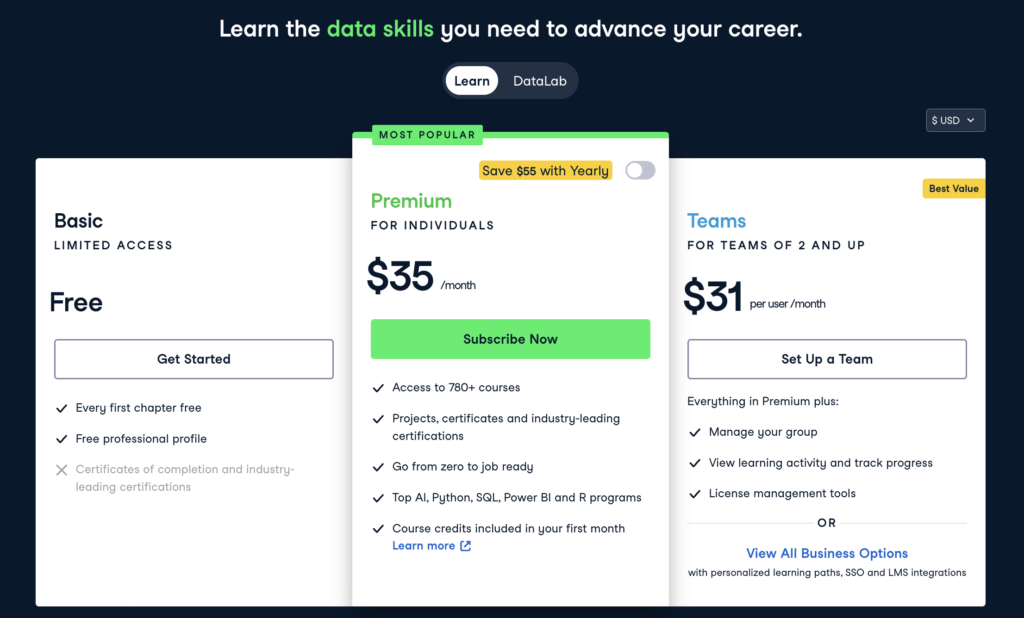
The free plan: what you actually get
DataCamp’s Basic plan is free forever, and it’s worth understanding exactly where it stops.
With a Basic account you get the first chapter of every course, a free professional profile, and access to some daily practice. That first-chapter access is the real value. DataCamp has 780+ courses, so you can open dozens of them, complete the opening chapter, and get a clear feel for the teaching style, the in-browser coding environment, and whether a track matches your level, all without paying.
What you don’t get is everything after chapter one. No full courses, no projects, no skill assessments, no certificates, and none of the industry certifications. The moment you want to finish a course or put a credential on your CV, you’re into Premium.
Treat Basic as an extended test drive rather than a way to actually learn a skill start to finish. It’s generous enough to answer the only question that matters before you pay: does DataCamp’s hands-on, code-in-the-browser method work for you?
DataCamp Premium: what you actually pay
Premium is the plan DataCamp wants individuals on, and it’s the one nearly everyone ends up choosing if they’re past casual browsing.
At regular pricing, Premium is about $28/month billed annually, or $336 for the year (some DataCamp pages show it a touch lower, at $27.5/month). But DataCamp runs promotions constantly, often 50% off, and those drop the annual rate to around $14/month, or $168 for the year. Paying month to month is a flat $35/month with no discount. So the real question isn’t the sticker price, it’s whether you catch a promo: annual Premium lands somewhere between $168 and $336 depending on timing, and it’s almost always worth waiting for a sale.
Here’s the full breakdown:
| Billing option | What you pay | Effective monthly | Best for |
|---|---|---|---|
| Annual (regular) | $336/year | $28/month | Anyone committed to a learning goal |
| Annual (with promo) | ~$168/year | ~$14/month | Buying during a sale (they run often) |
| Monthly | $35/month | $35/month | Testing the platform for a month or two |
| Student (annual) | 50%+ off | Under $14/month | Verified college students |
For your money, Premium unlocks the entire library: 780+ interactive courses across Python, R, SQL, Power BI, Excel, and AI, plus 250+ real-world projects, skill assessments, and DataCamp’s industry-recognized certifications (Data Analyst, Data Scientist, AI Engineer, and Power BI, among others). New content ships every week, and course credits for the AI-assisted features are folded into the subscription.
The annual-versus-monthly math is stark. Twelve months of month-to-month billing runs $420, while the annual plan is $336 at regular price and about $168 during a promo. Unless you plan to learn for only a month and then stop, annual wins by a wide margin. Most people underestimate how long a career track takes, then pay the monthly premium for six months and spend more than the annual plan would have cost.
One catch the pricing page doesn’t spell out: the AI-assisted course credits are bundled with the annual plan, not the monthly one. If you go month to month, you don’t get them unless you upgrade to yearly. It’s another quiet nudge toward annual.
When to buy: wait for a sale
DataCamp discounts Premium so often that paying full price is close to a mistake. Sales tend to cluster around predictable windows: Black Friday and Cyber Monday in late November (usually the deepest cut), a New Year sale in early January, and a summer sale around June and July. During these, the annual plan drops to roughly $99–$168. Before you subscribe, check both datacamp.com/pricing and datacamp.com/promo, since the promo page often shows a lower number than the main one. If you’re not in a rush, wait for a window.
One thing to know before you commit: DataCamp doesn’t offer a real free trial on Premium, and it doesn’t refund unused time. More on both below, because they change how you should approach the first purchase.
Is DataCamp Premium worth it?
For the right learner, yes. For the wrong one, it’s an expensive subscription you’ll forget to cancel.
Premium is worth it if you learn by doing and you’re building practical data or AI skills you’ll use, not just collecting certificates. DataCamp’s format is short video, then immediate hands-on coding in the browser, with no setup. That works well for Python, SQL, R, and Power BI fundamentals, and for people who bounce off long lecture-style courses. At $336/year it’s cheaper than most university-backed alternatives, and the certifications carry real weight with employers hiring for data-adjacent roles.
It’s not worth it if you want deep, project-heavy computer science instruction or you already know the fundamentals and need advanced, specialized material. DataCamp goes wide rather than deep, and stronger learners sometimes finish the useful tracks in a few months and keep paying for a library they’ve outgrown. If that’s you, the monthly plan for a focused sprint beats an annual commitment.
The per-course math makes the value concrete. At $168 a year, if you finish 10 courses you’ve paid about $17 per course; finish 20 and it’s under $9 each. DataCamp courses average around four hours, so a committed year of 40-plus hours works out to roughly $4 an hour. That’s the cheapest per-hour rate in the data-learning space, but only if you actually log the hours. Finish zero courses and you’ve spent $168 on nothing, which is the real risk with any annual plan.
The break-even logic is simple. If you’ll finish more than a couple of months of learning, annual Premium is the cheapest way to do it. If you’re weighing DataCamp against a direct rival, our DataCamp vs Dataquest comparison and DataCamp vs Codecademy comparison both dig into who each platform actually suits.
DataCamp for Business: Teams and Enterprise
DataCamp’s business pricing works differently from individual plans. It’s built for companies that want to train employees at scale, with admin controls and reporting.
Teams is for groups of 2 to 500 people and costs $28 per user per month, billed annually. That’s the same per-seat rate as individual Premium, but each seat adds group management, learning-activity tracking, license management, priority support, and reporting integrations including Power BI and Tableau, plus LMS integrations for tools like Degreed and Cornerstone. For a small L&D team, it’s a clean way to give everyone the full library with visibility into who’s actually completing courses. One thing to be clear-eyed about: there’s no volume discount below Enterprise scale. At 5 users or 15, you pay the same $28 per seat you’d pay as an individual, so you’re buying the manager dashboard and license controls, not a lower rate. If nobody will look at the dashboard, individual Premium subs reimbursed on expenses cost the same with less setup.
Enterprise is for larger organizations and is priced by custom quote. It includes everything in Teams plus personalized, adaptive learning paths, advanced analytics and reporting, single sign-on through Okta, Auth0, Azure, and others, LMS/LXP integrations, a skill matrix, and activity logs. There’s no public price, so you’ll talk to their sales team, and larger commitments typically negotiate rates below the listed Teams figure.
A couple of practical notes. Educators can get a free Teams plan for classroom use through DataCamp’s universities program. And DataCamp separately offers a Data & AI Unlimited plan aimed at organizations that want broader access beyond the standard Teams setup, quoted case by case.
| Plan | Users | Price | Best for |
|---|---|---|---|
| Teams | 2–500 | $28/user/year billed annually | SMBs, department-level L&D |
| Enterprise | Custom | Custom quote | Large orgs needing SSO, LMS, custom content |
DataCamp free trial and refund policy
This is where DataCamp differs from most subscription platforms, and it’s worth knowing before you pay.
DataCamp does not run a standard free trial on Premium. The free Basic account, with its first chapter of every course, is the intended way to evaluate the platform. Occasionally DataCamp runs a limited 7-day trial during promotional windows, and verified students can get three months of full access free through the GitHub Student Developer Pack, but neither is a reliable, always-on trial.
On refunds, DataCamp’s policy is strict: no refunds or prorations for unused time. Canceling stops your next billing cycle but doesn’t return money for the current one, and you keep access until the paid period ends. Refunds are granted only for billing errors, such as an accidental double charge or a duplicate account. Monthly subscribers can pause their account for a set period instead of canceling; annual subscribers cannot pause.
The practical takeaway: because there’s no trial and no refund, spend real time in the free Basic account first. Open the first chapters of the exact courses you’d take, confirm the format works for you, and only then commit to annual.
How DataCamp compares to competitors on price
| Platform | Individual subscription | Certificates included | Best for |
|---|---|---|---|
| DataCamp Premium | $168–$336/year | Yes, unlimited | Hands-on data and AI skills |
| Codecademy Plus | ~$180/year (Pro ~$240/year) | Yes | General coding, career paths |
| Dataquest Premium | ~$399/year | Yes | Self-paced data science, project-heavy |
| Coursera Plus | $399/year | Yes, unlimited | University-backed credentials |
| Udemy | $11–$200 per course (no subscription) | Yes, per course | One-off skill purchases |
The honest read: DataCamp sits in the affordable middle. Codecademy Plus undercuts it and covers broader programming, but its data-specific depth is thinner. Dataquest costs more and leans harder into projects and portfolio work, which some learners prefer. Coursera Plus is pricier and pulls its weight through university and Big Tech certificates rather than hands-on coding drills. Udemy is cheapest if you catch its frequent sales, but you’re buying single courses with no unified path.
DataCamp’s edge is the format and the certifications. If you specifically want to learn data and AI skills by writing code from the first minute, and you want a recognized certificate at the end, it’s priced fairly for what it delivers. If you want a degree-adjacent credential, Coursera is the better spend.
What users say about DataCamp pricing in 2026
On Premium
Most learners who chose annual say it paid off once they committed to a full career track, because the per-month cost drops well below what monthly billing would have cost over the same period. The most common complaint isn’t the price itself but the auto-renewal combined with the no-refund policy, which catches people who forget to cancel before the yearly charge hits.
On the monthly plan
Learners who took the monthly plan for a focused month or two generally feel it’s fair for the volume of content, but several note that life gets in the way and a “one month” plan quietly becomes four or five, at which point they wish they’d gone annual.
On business plans
L&D managers tend to find the Teams plan reasonable next to alternatives like Coursera for Teams or Udemy Business, and they single out the Power BI and Tableau reporting integrations as a real plus. The friction shows up on the free tier: some expected more than a single free chapter per course before buying seats for a group.
Frequently asked questions
Is DataCamp free?
Partly. The Basic plan is free forever and gives you the first chapter of every course plus a free professional profile, but no full courses, projects, or certificates. For anything beyond chapter one, you need Premium at $28/month billed annually.
How much does DataCamp Premium cost per month?
At regular pricing Premium is about $28/month billed annually ($336/year), and DataCamp’s frequent promotions drop that to roughly $14/month ($168/year). Month to month is a flat $35/month with no discount. For anyone learning longer than a month or two, the annual plan, especially during a sale, is far cheaper.
Does DataCamp have a free trial?
Not as a standard offer. The free Basic account is the intended way to test the platform. DataCamp occasionally runs a limited 7-day trial during promotions, and verified students can get three months free through the GitHub Student Developer Pack, but there’s no always-available Premium trial.
Can I get a refund from DataCamp?
Generally no. DataCamp doesn’t refund or prorate unused time. Canceling stops your next charge, and you keep access until the current period ends. Refunds are made only for billing errors like duplicate charges. Monthly subscribers can pause instead of canceling; annual subscribers cannot.
How does DataCamp for Business pricing work?
Teams costs $28 per user per month, billed annually, for groups of 2 to 500, and adds admin dashboards, progress tracking, and reporting and LMS integrations. Enterprise is custom-quoted for larger organizations and adds SSO, custom learning paths, advanced analytics, and LMS/LXP integrations.
Is DataCamp worth it for a career change?
If you’re building data or AI skills from scratch and you learn by doing, yes. At $336/year Premium covers the full path from beginner Python or SQL to job-ready certifications for less than most university-backed platforms. If you already know the fundamentals or want deep specialized material, a shorter monthly sprint or a project-heavy rival like Dataquest may fit better.
Is there a DataCamp student discount?
Yes. Verified college students get more than 50% off Premium through the student plan, bringing the effective cost under $14/month. Students can also unlock three months free via the GitHub Student Developer Pack.
The bottom line
DataCamp’s pricing rewards commitment and punishes indecision. If you’re serious about learning data or AI skills and you like coding from the first minute, annual Premium — $336/year at regular price, and as low as $168 during DataCamp’s frequent promos — is the clear choice, cheaper over any real learning period than the flat $35/month rate and cheaper than most university-backed alternatives. The free Basic account is your trial, so use it properly before you pay, because there’s no refund once the annual charge lands. For teams, the $28-per-user Teams plan gives you the same library plus the tracking and integrations a group needs. And if you only need a month of focused study, take the monthly plan, finish fast, and cancel before it renews.